Thursday, 27 September 2012

What Wipro, HCL, Infosys want in next generation leaders?

Check what actually the best companies HCL, WIPRO and INFOSYS are looking for,
We will discuss what they want in next generation leaders..

Infosys Students Banner

According to the news in Times Of India Bangalore Infosys, Wipro, HCL and others are drawing up a new checklist of traits they want their next generation of leaders to have. 

"One needs to have more courage now," says Matt Barney, vice-president and director, Infosys Leadership Institute, referring to employees in leadership roles. "It takes courage to predict what may happen with clients and businesses on a cognitive and computational front." Barney is also on the lookout for those who can learn and are innovative enough to interpret complex problems and come up with practical solutions that clients can apply. 

For Barney, such traits are specific to IT because of the faster pace of change. "Till few years back, there was no cloud and before that no Java... one needs to be disruptive here," he adds. 

Wipro is putting junior and middle management employees through psychometric tests to spot leaders with resilience and detachment. Those chosen are then measured on how they have bounced back from failure. Ability to cope with setbacks is emerging as crucial trait in a volatile economic environment. 

Last year, an MNC IT firm appointed a 39-year-old as head of its business unit in India. Though he was of Indian origin, he had never worked here. He struggled initially. Later, he and consulting firm E&Y changed business tactics. The duo altered business model, made performance management razor sharp and had weekly sales performance reviews instead of bi-annually. He stabilised the Indian business in 18 months. 

"While the last downturn was a lesson for senior leaders, this dip in business cycle is for the younger lot to learn from," said Milan Sheth, technical senior trade and partner at E&Y. 

Business model changes forced by the global economic slowdown are forcing changes too. IT companies are moving to a non-linear model where they are trying to delink revenue growth from the need to hire more hands. 

In the last five years, the average revenue earned per employee in the sector has increased by 19-20% for companies like Infosys and TCS. 

"Earlier, more people on payrolls meant more revenue. But now, clients want more services from a smaller manpower," said PrashantBhatnagar, director - hiring and staffing for SapientNitro, marketing-technology division of technology firm Sapient. "This means hunting for those who are adaptable to disruption and change, can take risks and shorten their tenure of failure quickly," he added. Bhatnagar estimates that around 12% of 2.8 million industry workforce could be thrust in roles that could demand some form of leadership. Sapient employs 7,000 in India and has tweaked its talent selection procedure to seek out candidates who are comfortable with unknown settings. 

IT services firm HCL wants employees who are capable of engaging with clients across different geographies, social and economic backgrounds. "We need employees who are good at problem solving, understand different industries and not just IT. Someone who disrupts our status quo and questions our ideas", says NaveenNarayanan, global head - talent acquisition, HCL Technologies. Narayanan gives the example of a junior employee who came up with the idea of an in-house social media portal. Though the senior management was sceptical about the idea, the employee persisted and managed to convince the top brass on need for it. Today more than 3/4 th of the employees are on it. 

Aegis has picked a crack team of 500 employees with an average age of 25-35 years from its 57,000 strong workforce to help it beat competitors on price and margins. Aegis will put this lot into live projects and assignments that deal mainly with cost optimisation and negotiation with clients along with mentoring sessions. "There was not so much focus on costs earlier and now we need employees who are good at people management in these tough times," said SM Gupta, HR head for the company. 

This sector hires around 2 lakh engineers in a year and according to a Randstad study is expected to add 227,328 jobs till the end of 2012. "Till now, concentration was more towards engineering which has left space for coaching in leadership development," says Infy's Barney. 

Mid-rung IT firms that employ only a few thousands have it tough as well. They do not have the luxury of keeping people on the bench to train them. Training needs to happen even as they are executing contracts. "We need those who are good at managing paradoxes-change in business cycles that are more frequent now," said C Mahalingam, HR head of Symphony. 

While earlier these companies could afford employees who could take risks rarely after much deliberation, today they need managers who can place bets often and get them right at first shot. A lot, who can ruthlessly stop businesses that do not pay, include training only where it is needed and cut investments that take time to mature, Mahalingam added. 

The company, therefore, has changed its mentoring route that is focussed on "management of paradoxes." During leadership training, focus is now on finding answers to problems that have more than one solution rather than an 'either/or'.

Source: Times Of India


How to Remove Memory Card Password - 2012 Updated Trick

Do you forget the password of your memory card ?
Learn how to quickly unlock password protected memory cards in two ways.

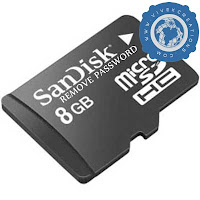
Remove memory card password

1# Format the memory card

Well you can simply break the password of memory card by just formatting it. Use card reader to connect your memory card with computer. And simply format it by clicking on memory card icon. 

NOTE:  Don't use the Quick Format option for this process.

2# Use 3rd Party Software for Symbian mobiles

  • Download FExplorer applications from here (download in your mobile device any Symbian mobile). 
  • Install and  run FExplorer from your Mobile Device where is password protected memory card.
  • Go to C: System Folder.
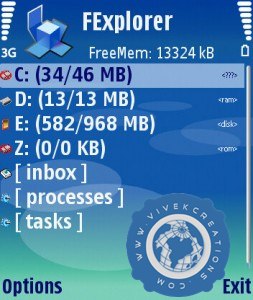
FExplorer For Unlocking the password of memory cards

  • Then, search for a file named mmcstore
  • Copy that file into your computer (the file will show as a notepad file)
  • Open that file in your Computer using Notepad
  • Now, you will see your memory card password has been removed.

NOTE:  Use Symbian Mobiles for this, tested in Nokia S60 first and second edition mobiles.

It's too much easy to remove the passwords from memory cards, if you are still facing any kind of problem regarding this article or any file then you can simply contact with us through our contact us form.


Free Download FExplorer Latest Versions

Unlock your memory card and explore your file manager with latest versions of FExplorer,
All updated versions available here.

FExplorer For Unlocking the password of memory cards

FExplorer now a days is a growing and best file manager application application, in latest versions you can even send the installed applications from your phone to another phone via Bluetooth.
You can easily recover your memory card password with the help of FExplorer without losing any data from your card for more on this phase [Read: How to recover memory card password]

  • FExplorer 1.17 Version (S60 1st and 2nd Edition) Download
  • FExplorer 1.18 Version (S60 1st Edition)  Download
  • FExplorer 1.18 Version (S60 2nd Edition)  Download
All versions are free and latest uploaded files, 
Still if you are facing any problem in downloading the files then please mention in comment.
Comment out your experience of FExplorer application.

Thursday, 20 September 2012

How To Protect Your Mobile Devices With Antivirus


Mostly times, the virus attack cause due to the maximum use of internet browsing like, downloading images, emails, songs etc. In many cases, too much friendly behaviour of your mobile phone to the internet can lead to danger and threats of virus and spyware, which in the near future can destroy your mobile phone and can destroy all the existing files.

Therefore, the best solution to this problem is to check your mobile phone with the antivirus. Bitdefender Antivirus can be the ideal choice to protect your phone from any spyware and virus attack. This antivirus gives you a real and exact security support for the mobile phones.

Cell Phone Security

Service of Bitdefender Antivirus

Bitdefender Antivirus is available free, and one can easily download the antivirus on the mobile phone and enjoy the service and protection of mobile phone from any malware or spyware. If you face any sort of virus problem, then this antivirus is always there to give you more authentic and reliable antivirus service without any second thought. This is an award-winning antivirus whose main motto is to serve for the users’ satisfaction and five them the authentic and perfect result to check dangerous virus while you browse through your mobile phones. Apart from mobile phone antivirus, Bitfender also gives 100% security for computers and laptops.

Security service for your Android:

Devices, which run on Android, can also utilize the benefit of Bitdefender mobile security for Android. This antivirus gives you the service with smart and unique approach. Web security is the prime focus of the antivirus. The technology that is used in scanning the virus depends on in-the-cloud technology. The technology is so advanced that this antivirus does not put any strain on the battery life and provide perfect outcome. The security service provider also helps the user with various privacy and information about data security. In a way, for Android, it is the best security solution to achieve positive and unique result.

Android Phone Security

Security application for iPhone

Bitdefender Clueful for iPhone is a security application, which helps the user to get a clear about the applications on the store. It has the ability to check or filter the application that is already these in your iPhone. In this way, it will help the user to avail the high security services. This security service is only here to inform you about the information that is not known to you and keep you safe. iPhone user can get the maximum return of security service.

Therefore, next time if you are in use of your mobile phones for the internet or emails, then download of Bitdefender antivirus is must and protect your phone from all sorts of danger. It is a complete package of security service that you can enjoy on your mobile phone and in return receive safe and secure browsing. The service of the aforesaid antivirus is your ultimate choice to protect your phone from danger. 

You can take the help of various websites to download the latest version of antivirus, protect your phone from the dangerous malware and spyware, and take the pleasure of happy browse.

Friday, 14 September 2012

How To Prevent your Blogger Blog from Redirecting to Country-Specific URLs


Google, as most would know, redirects Blogger blogs to country-specific domains. For instance, if you open example.blogspot.com in your browser, you might be redirected to example.blogspot.in if you are located in India or to example.blogspot.com.au if you access the same blog from Australia.

The main reason why Google implemented country-specific redirection is selective censorship – they can now easily block a blog, or a particular page on a blog, in one country but still serve it in other regions.

Blogger Domain Redirecting Countries

Blogger and Country-Specific Domains

My traffic logs suggest that country-specific redirection in Blogger is now live in at least 15 countries. Here’s a complete list:

India [blogspot.in], Australia [blogspot.com.au], UK [blogspot.co.uk], Japan [blogspot.jp], New Zealand [blogspot.co.nz], Canada [blogspot.ca], Germany [blogspot.de], Italy [blogspot.it], France [blogspot.fr], Sweden [blogspot.se], Spain [blogspot.com.es], Portugal [blogspot.pt], Brazil [blogspot.com.br], Argentina [blogspot.com.ar], Mexico [blogspot.mx]

Prevent Blogger from Redirecting to Country-Specific Domains

This country based URL redirection does mean some negative consequences to your Blogger blog. For example:

  1. The social stats – or Facebook Likes, Google +1s and Tweet counts – for your blog stories may be diluted as the URLs for the same story become different from different visitors.
  2. You will have a similar problem if you are using an external commenting platform like Disqus or Facebook Comments.
  3. Also, if canonicalization isn’t implemented properly, it may cost you some Google juice as external websites may link to your country-specific pages.

If you are not happy with the idea of Blogger redirecting your blog to a different URL, you can add the following piece of code to your Blogger template and it will always serve the .com address to your visitors irrespective of their geographic location.

Go to your blog inside the Blogger Dashboard and choose Template. Then click the “Edit HTML” button followed by “Proceed.” Next, copy-paste the following code into the template after the <head> tag.


Click the Save Template button and now your Blogger Blog will always serve with the blogspot.com URL.

This simple script parses the domain name (document.location.hostname) of your blog page and if it includes a country-specific URL (like blogspot.in), it will force-redirect the visitor to the blogspot.com address using the /ncr switch.Click the Save Template button and now your Blogger Blog will always serve with the blogspot.com URL.

Thursday, 13 September 2012

Update Facebook Status via iPhone 5

iPhone 5 Metallic Touch

You can update your facebook status via iPhone 5 now, in short, one more option has been added in our Fake Facebook Status Machine.
Just check the last option in our Fake Facebook Status Machine, Or directly Click Here to update your facebook status via iPhone 5. It will looks like this:

Facebook Status via iPhone 5

Simply write your status as in image it is Hello :) and then click on Share button. Your status will be update via iPhone 5 immediately.
You can update your status via many more other things also, just go to our Fake Facebook Status Machine for more. Enjoy iPhone 5 :)

Monday, 10 September 2012

How To Download Wikipedia And Take It Anywhere Offline!


take wikipedia offline
Wikipedia is the world leader in providing information. You can find information there on virtually any topic you can think of, from sports to gaming to tourism, and many out-of-the-blue kind of topics. It has rightly earned the number 6 spot in website rankings worldwide according to Alexa rankings. But the problem with Wikipedia is, you can’t access the information offline. You need to have connectivity to the internet for accessing Wikipedia, which makes Encyclopedias somewhat of a handier option. But now, with your smartphones, tablets or PCs, you can download Wikipedia, and access it offline from anywhere in the World! Here are 5 ways you can take Wikipedia offline.

1. WikiTaxi

The guys at Wikipedia themselves provide Wikipedia dumps, which are updated regularly. These are archives of their entire database, usually in the form of .xml files. These are large files up-to GBs in size. You can download them using a download manager. Once downloaded, they can be read by a software called WikiTaxi. Once downloaded, you can import the dumps into the software, which will then uncompress them and render them for use.
WikiTaxi

2. Zipedia

Zipedia is another easy solution for accessing Wikipedia offline. It’s a Firefox extension that browses the website offline. You just have to download the same Wikipedia dumps as for WikiTaxi. And you can then use this tool to open the dumps in the form of a webpage.

3. WikiSlice

WikiSlice is another great tool that works in a different way. Forget those large databases that take forever to download. For those of you who go on Wikipedia a lot, you can use the WikiSlice browser tool or the desktop application to save Wikipedia articles for future reading. Ideal if you don’t want the excessively large database dumps.

4. Wiki Offline App

Wiki Offline is an iOS that allows you to download Wikipedia directly to your iPhone or iPad. You can download the entire Wikipedia database, and access it offline. Images are not included by default to minimize the size, but if you have internet access, you can get images directly too.
Wiki Offline

5. Wikireader

Now this one is for gadget lovers out there. You can buy this cool, info gadget from any large store. It has a 3.5 inch capacitive touch-screen, and is portable, just like your cell phone. And it costs just $99! It can accommodate millions of Wikipedia articles, and can be updated for the latest content!
WikiReader
Those were the top 5 ways you can download Wikipedia offline. If you have questions, feel free to ask them in the comments below. We’ll be obliged to help